Know your website works.
Every page, every day.
Avospy watches availability, SSL, Google index and clicks, the SEO of every page, speed and broken links — and tells you in plain words what is fine, what is worth fixing and what to fix right now.
No credit card · first results in seconds · cancel any time
Or check any site for free, right now
Free, no sign-up — SSL, response time, meta tags and technical SEO in about 15 seconds.
Works with any MCP client
17
Monitor types
5 min
Check interval
38
MCP tools
How it works
Three steps, and only the first one is yours.
Add your site
Paste the address — or ask your AI agent to do it. The first checks finish in seconds: availability, SSL, DNS, indexability and the homepage SEO.
Avospy watches every day
Uptime every 5 minutes. Every page from your sitemap daily. Google index and clicks, real-visitor speed, redirects, links and tracking codes — without you lifting a finger.
You get a traffic light
Green: fine. Orange: worth fixing, with why and how long it takes. Red: fix now — sent straight to your e-mail, Slack, Discord or a webhook.
Plain words instead of raw data
You do not need to know what a canonical tag or LCP is. Every finding says what happened, why it matters and how long the fix takes. The details are one click away when you want them.
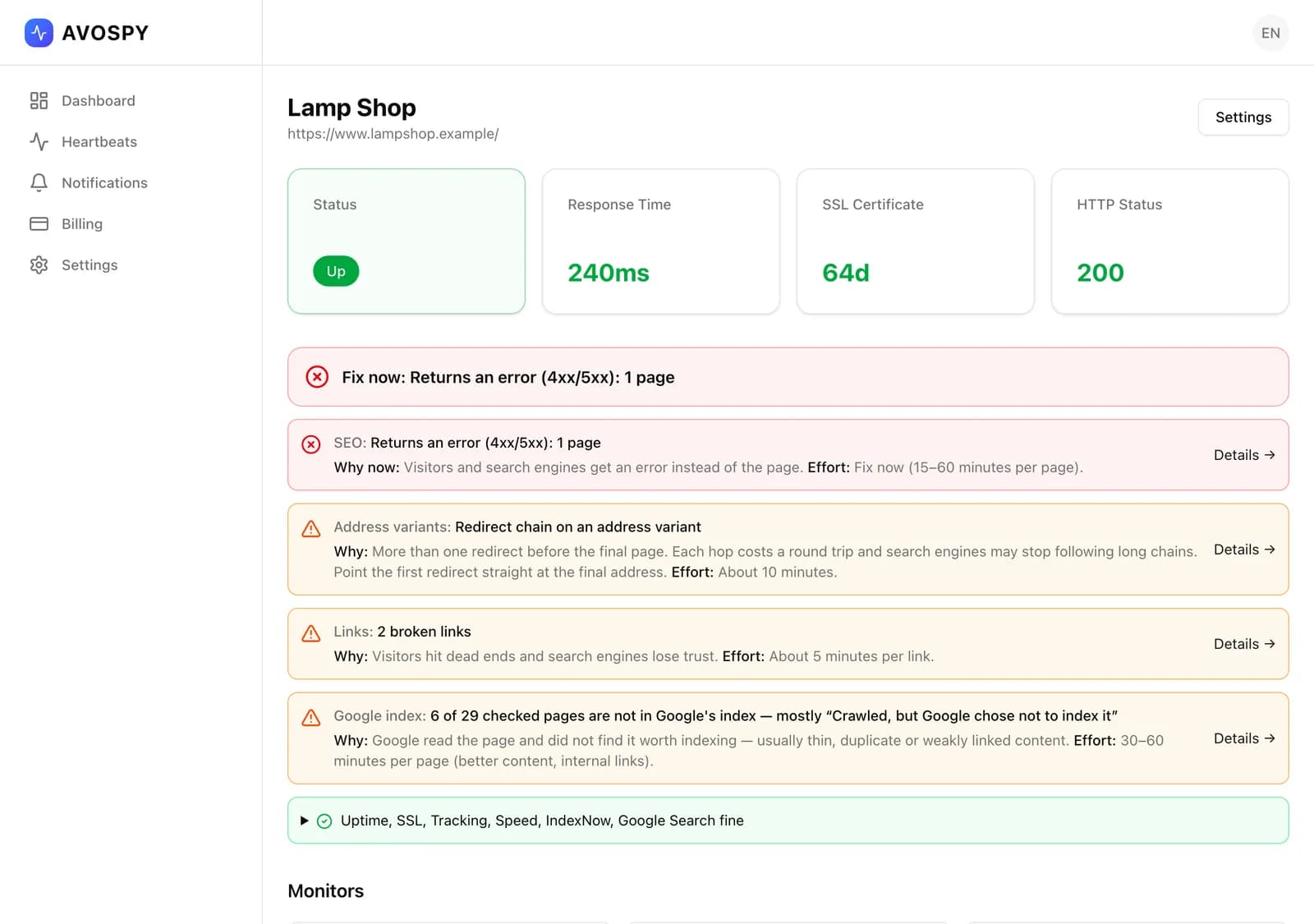
Fix now: a product page returns 404
Visitors and Google get an error instead of the page. Effort: 15–60 minutes.
Worth fixing: 3 pages have no meta description
Google writes its own snippet, which usually gets fewer clicks. Effort: about 2 minutes per page.
Fine: SSL valid for 64 days · online · fast for real visitors
Green stays short. Nothing to read when nothing is wrong.
A look inside
Real screens from the app, with a demo shop. Simple at first sight — and all the detail one click away.
One page tells you how the site is doing
Every area gets a verdict. Green means fine and stays short. Orange says why it matters and how long the fix takes. Red means fix it now. Click any line for the details.
What exactly is checked
- Uptime every 5 minutes, double-checked before an alert
- SSL certificate: expiry, chain, warnings at 30, 14 and 7 days
- www, http and https variants: all of them must lead to one address
- SEO of every page in the sitemap, tracking codes, broken links
- Speed for real visitors, Google index and clicks from Google
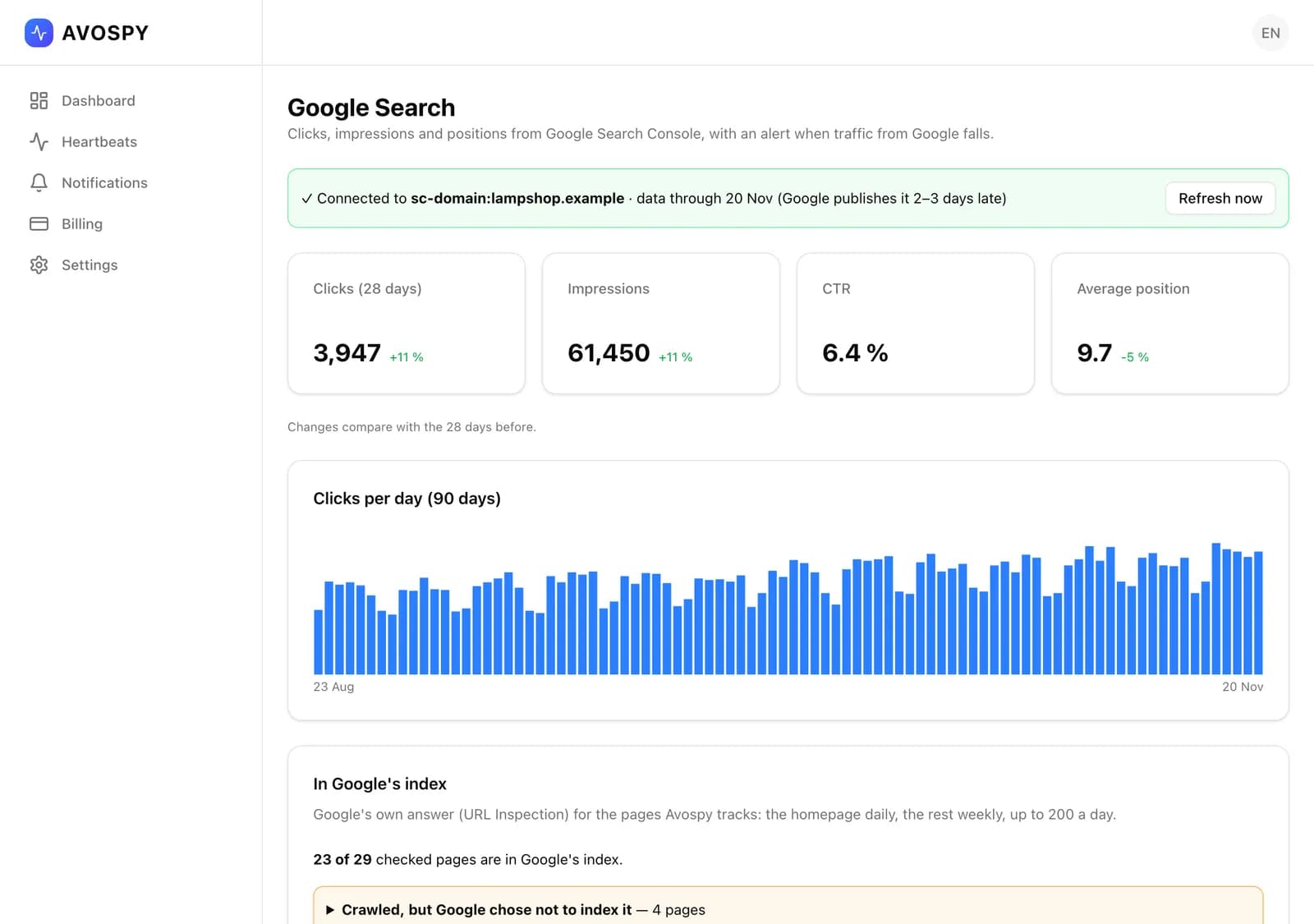
What Google sees — and when it changes
Connect Google Search Console in two minutes (read-only). You see clicks, positions and top searches, which pages Google left out of its index and why, and you get an alert when traffic from Google falls.
What exactly is checked
- Clicks, impressions, CTR and average position, compared with the 28 days before
- Drop alert: the last 7 days against an average week, with the SEO changes that may explain it
- Index status of your pages straight from Google (URL Inspection), with the reason and the fix
- Sitemaps Google has, and Google's own e-mails about manual actions and security problems
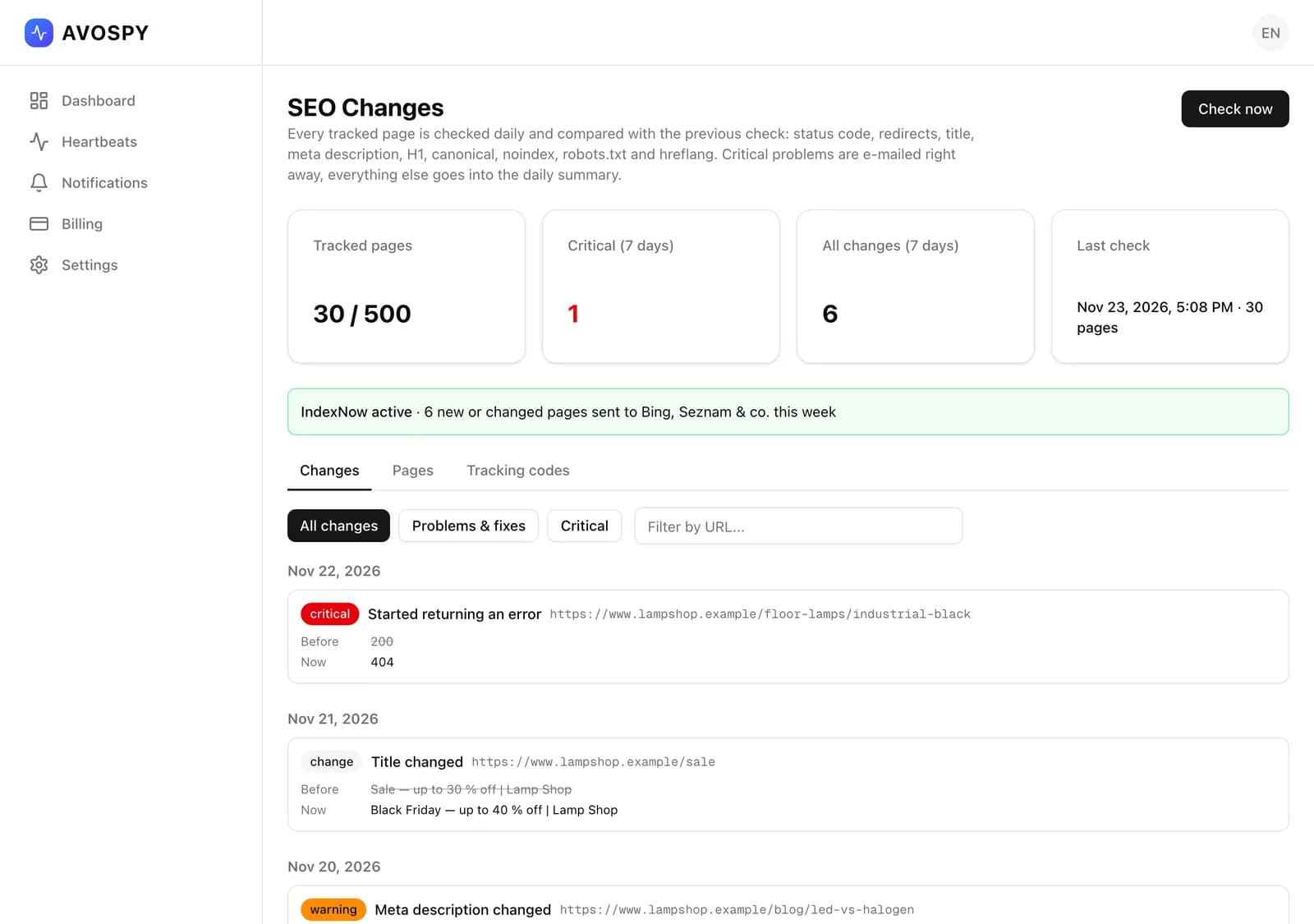
Every page, every day, compared with yesterday
A deploy that adds noindex, a product page that suddenly answers 404, a title that changed — you see exactly what changed, where, and what it was before.
What exactly is checked
- Status code, redirects, title, meta description, H1, canonical, noindex, robots.txt, hreflang
- Pages from your sitemap, or found through links when there is none (50 to 5,000 per site)
- New and changed pages go to Bing and Seznam right away through IndexNow
- Critical changes alert at once, the rest comes in a daily or weekly summary
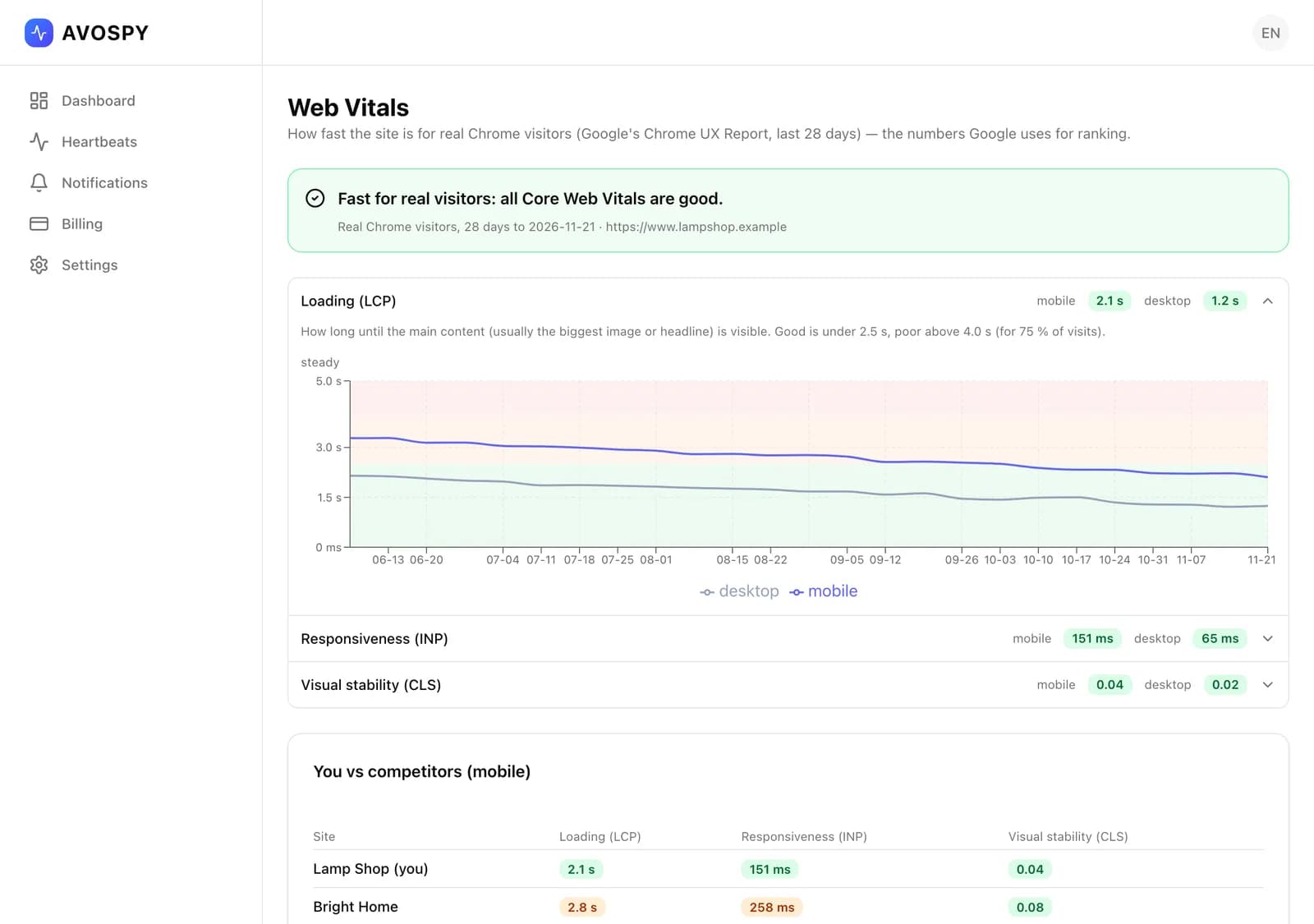
Speed for real visitors
Core Web Vitals from real Chrome users, 25 weeks back, next to your competitors.
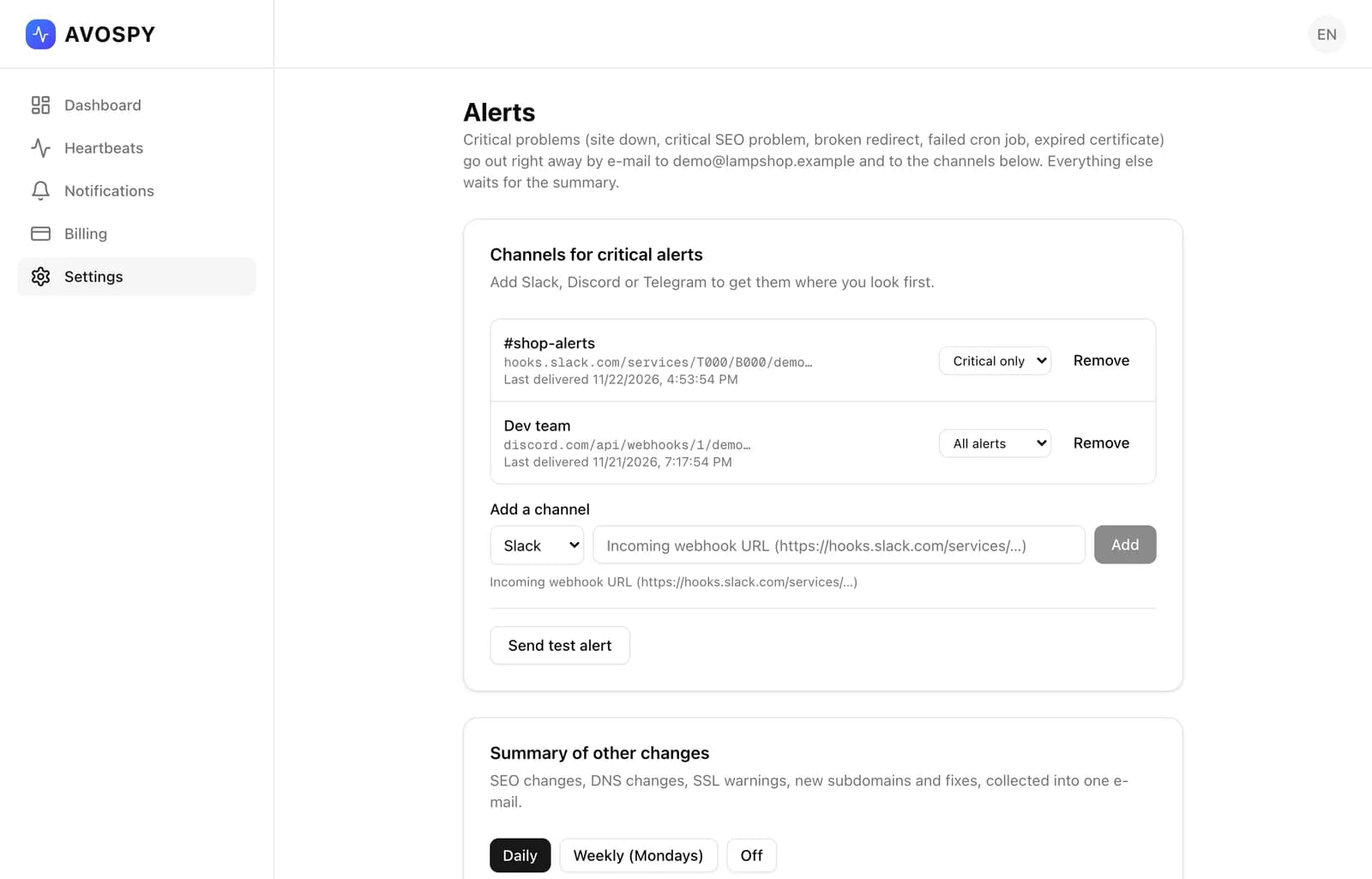
Alerts where you look first
E-mail, Slack, Discord or a webhook. Critical right away, the rest in one summary.
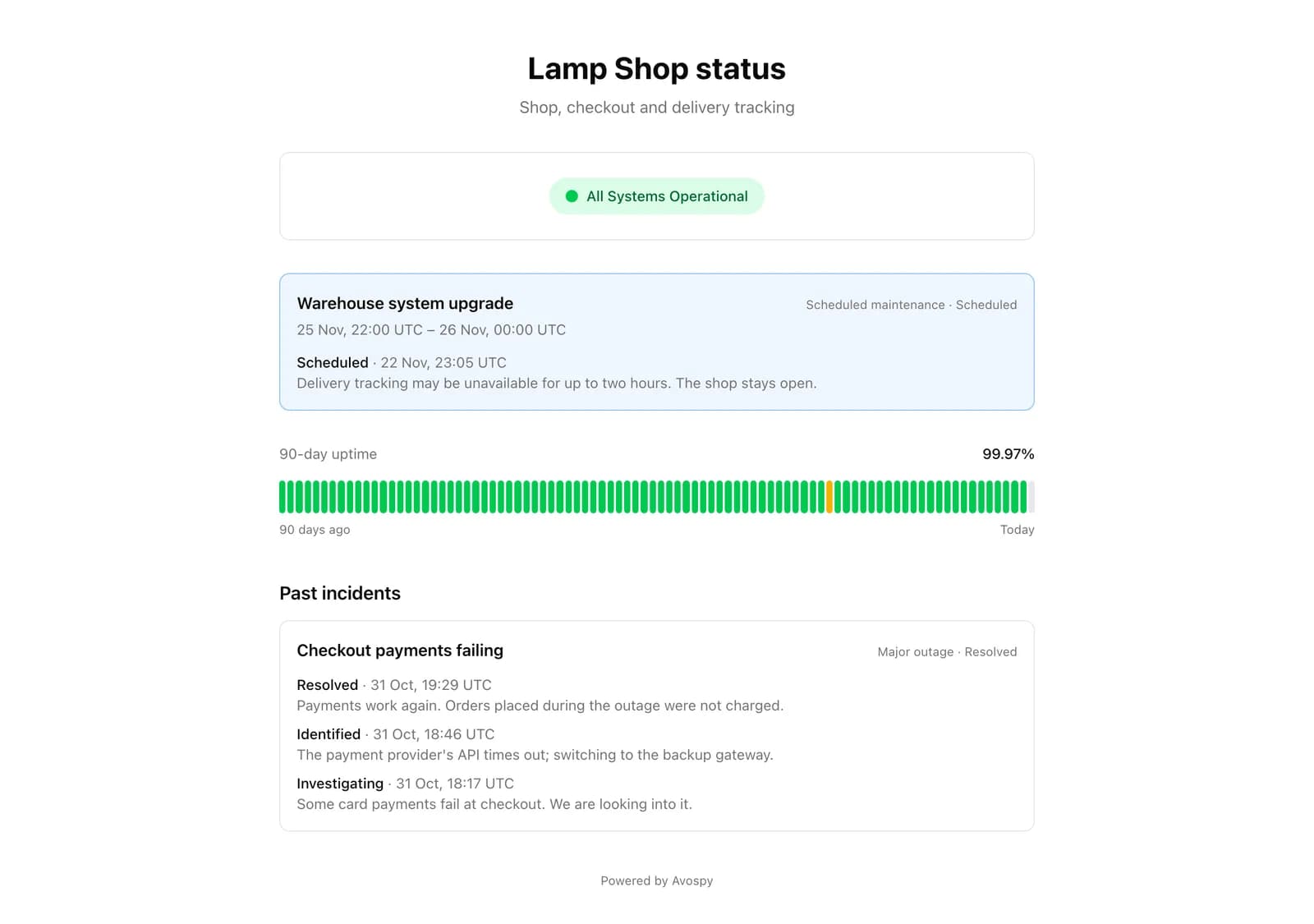
A status page for your customers
Live uptime, incidents and planned maintenance on a public page with your name.
Websites break quietly
Most problems do not take the site down. They cost visitors, sales and Google rankings for weeks before anyone notices. A daily check catches them the same day.
A deploy adds noindex
Google drops the pages within days. Every page is checked daily, so you know the same day.
The certificate does not renew
Browsers show a security warning and visitors leave. Warnings at 30, 14 and 7 days, red when it expires.
A page falls out of Google's index
Its traffic disappears without a sound. Avospy asks Google directly and tells you why.
Clicks from Google fall
A Google update or a change on the site? Every week is compared, next to the SEO changes that could explain it.
The tracking code disappears
Marketing flies blind for weeks. GA4, Tag Manager, Meta pixel and the consent banner are watched on every page.
The site is slow for real visitors
Slow pages lose sales. Real Chrome data, a weekly trend and your competitors next to you.
What the first week found on our own 36 websites
29
sites answered on both www and non-www — Google saw two copies
71 / 200
checked pages of one site were missing from Google's index
1
page returned a server error, unnoticed
−51 %
clicks from Google in one week on one site — an alert, not a surprise next month
Or hand it all to your AI agent
Every action in Avospy is a tool your agent can call. You describe the outcome — it checks, sets up and reports back.
>I just deployed shop.example.com. Check it and make sure it's monitored.
●avospy · check_website(url: "shop.example.com", fresh: true)
└score 92/100 · SSL valid 74 days · 1 warning: no og:image
●avospy · add_project(name: "Shop", url: "https://shop.example.com")
└monitoring started · uptime every 5 min
●avospy · create_heartbeat(name: "Nightly backup", intervalMinutes: 1440)
└ping URL added to the crontab
Deploy looks healthy — score 92/100, certificate valid for 74 days. One fix worth doing: add an og:image so shared links show a preview. The site is now monitored, and your nightly backup pings a heartbeat, so you'll hear about it if it ever stops running.
Check every deploy
>I just shipped. Is anything broken on example.com?
Score, failing checks and 404s with the page they sit on — before your users find them.
Set up monitoring in one sentence
>Monitor my three client sites and give each one a public status page.
Projects, status pages and README badges — without opening a dashboard.
Guard cron jobs and backups
>Make sure the nightly backup actually runs.
The agent creates a heartbeat and adds the ping to your crontab or CI workflow itself.
Triage incidents
>Why did I get a downtime alert at 3 a.m.?
Timeline, response times and SSL/DNS state in one answer — then it marks the alerts as read.
Get a fix list, not a dashboard
>What should I fix first across my sites this week?
Prioritised fixes from Lighthouse, Core Web Vitals, SEO and broken links — and your coding agent can apply them.
Watch competitors and content
>Tell me when rival.com changes their pricing.
Tech stack, content and single-element changes, checked daily, with an alert when they move.
Connected in under a minute
A hosted, remote MCP endpoint — no local server, no SDK, no glue code.
Create a free account
14 days free, no credit card.
Mint a token
Settings → AI / MCP Access. One token per client, revocable anytime.
Add one line to your agent
Streamable HTTP + bearer token. Nothing to install or host.
claude mcp add --transport http avospy https://avospy.com/api/mcp \
--header "Authorization: Bearer avospy_mcp_YOUR_TOKEN"{
"mcpServers": {
"avospy": {
"url": "https://avospy.com/api/mcp",
"headers": {
"Authorization": "Bearer avospy_mcp_YOUR_TOKEN"
}
}
}
}38 tools — the whole product, not a demo
Everything you can do in the dashboard, your agent can do too. Plan limits apply exactly as they do in the UI.
Check & audit
check_websiteAudits any public URL on the spot — availability, speed, SSL, meta tags and technical SEO, with a score. No project needed.
get_project_overviewOne traffic-light verdict per area (uptime, SSL, SEO, redirects, speed, tracking, links): what to fix now, what to improve with effort, what is fine.
get_site_healthEverything we know about one project in one call: SSL, DNS, technical SEO, meta tags, Lighthouse, Core Web Vitals and broken links.
check_redirectsFollows the redirects of any URL hop by hop, or checks that all four variants of a domain (http/https, www) end on one address in one permanent redirect.
get_broken_linksBroken links and dead sitemap URLs from the latest crawl, each with the page it was found on.
run_scanRuns a check right now: the SEO change check of every tracked page (ideal after a deploy), a broken-link crawl or a sitemap check.
get_seo_changesWhat changed in the SEO of your pages since the last check — noindex, error codes, redirects, canonicals, titles, descriptions — with before and after.
get_seo_pagesCurrent SEO state of every tracked page with setup problems: noindex or redirects in the sitemap, duplicate titles, missing descriptions and H1s.
get_web_vitalsReal-user speed from Google (Core Web Vitals on mobile and desktop): a verdict, what to fix and how long it takes, the trend, 25 weeks of history and your competitors.
get_tracking_codesAnalytics, ad pixels and cookie banners on your pages (GA4, GTM, Meta pixel, Sklik…) with IDs and coverage; alerts when one disappears.
Read monitoring data
get_search_performanceClicks, impressions, CTR and positions from Google Search Console, top searches and pages, and the traffic-drop alert.
get_index_statusWhich tracked pages are in Google's index and Google's reason for the rest, plus the sitemaps Google has.
list_projectsEvery project in your account with its latest uptime check.
get_projectOne project in detail: latest check, SSL status and a 7-day uptime summary.
get_uptimeDay-by-day uptime and response times for the last 1–90 days (7 by default).
list_alertsRecent alerts — downtime, SSL expiry, DNS changes, new subdomains, watchdog hits — optionally for one project or unread only.
mark_alerts_readMarks alerts as read once your agent has dealt with them.
send_test_alertSends a test alert by e-mail and to every webhook and reports what arrived.
get_reportYour latest weekly AI report — generated on the spot if none exists yet.
list_status_incidentsIncidents and planned maintenance on a status page: what is open now and the last 30 days.
Set up & manage
setup_indexnowSends new and changed pages to Bing, Seznam and other IndexNow engines right after each check; returns the key file to publish.
track_pagesPins key pages the SEO change check must always cover, or unpins them.
list_alert_channelsWhere alerts go: e-mail, Slack, Discord, Telegram or SMS channels, and the summary rhythm.
add_alert_channelSends critical alerts to Slack, Discord or SMS as well as e-mail.
remove_alert_channelRemoves an alert channel.
set_digest_frequencyE-mails the summary of non-critical changes daily, weekly or not at all.
add_projectAdds a website. Uptime, SSL, DNS, SEO and performance checks start automatically.
configure_projectRename a project, change its URL, or pause and resume monitoring.
delete_projectRemoves a project and all of its history. Requires an explicit confirmation.
create_heartbeatCreates a heartbeat for a cron job or worker and returns the ping URL to call when it runs.
list_heartbeatsAll heartbeat monitors with their status, last ping and ping URL.
add_watchdogWatches one element of a page (CSS selector, XPath or regex) and alerts when its content changes.
list_watchdogsWatchdogs of a project with their current value and the last detected change.
add_competitorTracks a competitor's site — tech stack, social profiles and content changes.
connect_search_consoleConnects a project to Google Search Console (read-only) and says exactly what is missing if it cannot yet.
create_status_pagePublishes a public status page for a project and returns its URL plus Markdown for an uptime badge.
post_status_incidentPosts an incident (orange or red) or schedules maintenance (blue) on the public status page.
update_status_incidentAdds a public update to an incident or maintenance and moves it on, up to resolved or completed.
Per-client tokens
Mint one token per agent and revoke it in one click. Only a hash is stored.
Scoped to your account
An agent sees your projects and nothing else.
Safe by default
Tools are annotated read-only or write; deleting needs an explicit confirmation.
Readable by machines
Structured JSON answers, plus /llms.txt so agents can learn the product on their own.
17 monitors, one platform
Everything from uptime to competitor tracking — all of it readable by your agent.
Uptime
5-min checks, double-verify on failure
SSL
Expiry alerts, chain validation
DNS
Change detection across all record types
Tech SEO
robots.txt, sitemap, canonical, noindex
SEO Changes
Every page checked daily: noindex, redirects, canonicals, titles
SEO Analysis
Meta, OG tags, headings, schema.org
Web Vitals
Real CrUX data: LCP, CLS, INP, TTFB
Lighthouse
Automated audits on every check
Screenshots
Visual regression detection
Watchdog
CSS/XPath/regex change tracking
Competitors
Tech stack & social changes
Deep Scan
Broken links & sitemap health
Heartbeats
Alerts when a cron job or backup stops running
Subdomains
New subdomains from Certificate Transparency logs
Status Page
Public uptime, incidents and planned maintenance
Google Search
Clicks, positions, index status and Google's own messages
Alerts
E-mail, Slack, Discord, webhooks
Simple, transparent pricing
Every plan includes the MCP server. 14 days free, no credit card.
Starter
- 3 projects
- MCP server · all 38 tools
- 3 competitors/project
- 5 watchdogs
- 30-day retention
- 50 pages per site checked daily
- Google Search Console: clicks, index, Google's messages
- 5-min uptime checks
- Alerts: e-mail, Slack, Discord, webhooks
- All 17 monitors
Professional
- 15 projects
- MCP server · all 38 tools
- 5 competitors/project
- 20 watchdogs
- 180-day retention
- 500 pages per site checked daily
- Google Search Console: clicks, index, Google's messages
- 5-min uptime checks
- Alerts: e-mail, Slack, Discord, webhooks
- All 17 monitors
Business
- 50 projects
- MCP server · all 38 tools
- 10 competitors/project
- 30 watchdogs
- Unlimited retention
- 5,000 pages per site checked daily
- Google Search Console: clicks, index, Google's messages
- 5-min uptime checks
- Alerts: e-mail, Slack, Discord, webhooks
- All 17 monitors
Questions
Do I need an AI agent?
No. Everything works in the web app and alerts come by e-mail or to your chat. The MCP server is there if you want Claude, Cursor or another agent to check, set up and explain things for you.
Do I have to install anything on my site?
No. Avospy checks the site from outside, like a visitor or Google would. Only optional extras ask for a small file or tag (IndexNow, verifying the site for Search Console).
Is it safe to connect Google Search Console?
You add our address as a user of your property — Restricted (read-only) is enough. Our connection can only read, you can remove it any time, and the data is shown only after you prove the site is yours.
How quickly do I learn about a problem?
The site going down: within minutes (checked every 5 minutes, verified twice). A critical change on a page: the same day. Everything else comes in one daily or weekly summary, so your inbox stays calm.
Can I watch my clients' websites?
Yes. Every plan has several projects, each with its own alerts and status page. Agencies usually start on Professional.
What happens after the 14 days?
You choose a plan, or monitoring pauses. Nothing is charged without your card, and your data stays if you come back.
Know first, not last
Add your site and see its traffic light in a minute. 14 days free, no credit card.
Create Your Free Account